Protractor logo Protractor
PRINTABLE PROTRACTOR

Printable protractor

Updated

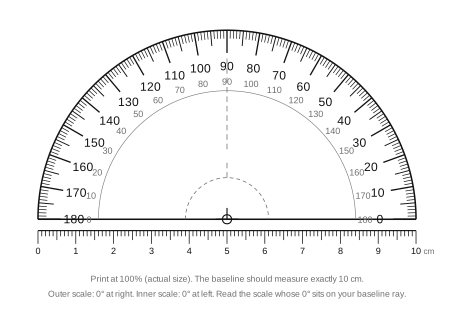
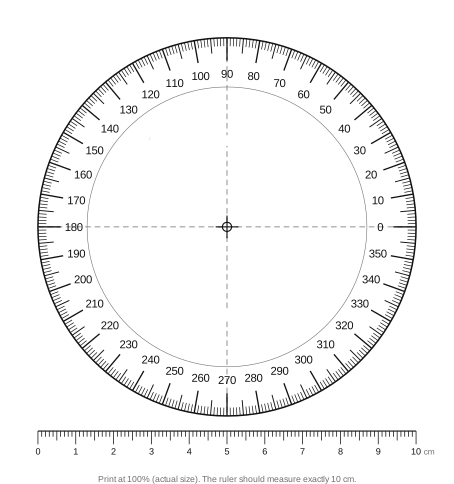
A free paper protractor you can print at real size: a 180° half-circle and a 360° full circle, each 10 cm across with 1° tick marks and numbers every 10°. Print at 100%, check the built-in 10 cm ruler, cut it out. Download the SVG or print straight from this page — only the protractor goes to the printer.

How to print the protractor at actual size

  1. Choose a protractor

    Pick the 180° half-circle for schoolwork and most drawing, or the 360° full circle for reflex angles and bearings. Press Print, or download the SVG and print it from any image viewer.

  2. Set the scale to 100%

    In the print dialog set Scale to 100% or "Actual size". Turn off "Fit to page", "Shrink to fit" and "Scale to fit media" — those shrink the sheet and every degree with it.

  3. Print on stiff paper if you can

    Card stock or a transparency sheet keeps the edge straight. Plain paper works; just keep it flat.

  4. Check the 10 cm ruler

    Measure the ruler printed under the protractor with a tape or ruler. It must read exactly 10 cm (100 mm). If it does not, the printer scaled the page — reprint at 100%.

  5. Cut it out

    Cut along the outer edge. Optionally cut out the dashed centre window on the 180° version so you can see the vertex through it, and poke a pin hole at the crosshair.

The 10 cm ruler is the whole quality check. A protractor's degrees are angles, so uniform scaling does not change them — a 90% print still reads 90° at a right angle — but the ruler tells you the printer did not distort the sheet, and it turns the base edge into a real 10 cm ruler you can use for the drawing itself. On US Letter, A4 or any larger paper the sheet fits with margins to spare; the 180° version is 12 × 8.2 cm and the 360° version 12 × 12.8 cm including the ruler.

How to use a paper protractor

A paper protractor works exactly like a plastic one. Place the centre crosshair on the vertex (the point where the two lines meet), turn the sheet so the baseline runs along one side of the angle, and read where the other side crosses the curved scale. On the 180° version, read the scale whose 0° sits on the side you aligned — outer if that side points right, inner if it points left — and check the answer against a square corner: an angle narrower than 90° must read under 90. The step-by-step with diagrams, including drawing angles and measuring reflex angles, is in how to use a protractor.

Because the paper is thin, you get one advantage over plastic: lay it directly on a drawing and the lines show through, so the origin is easy to seat exactly. Two things to avoid: a crease across the scale, and reading from a curled sheet — flatten it under a book first.

Card stock or transparency

A clear overhead transparency makes a see-through protractor you can align like a plastic one. Card stock gives a straight edge that survives a pencil case.

Cut out the centre window

The dashed half-circle around the origin on the 180° sheet is a cut line. Removing it lets you see the vertex and both rays under the paper.

Print a class set

The SVG is free to print as many times as you need for a classroom or a workshop. Print one first and check the ruler before running the whole batch.

180° or 360°?

The 180° protractor is the one to print for homework, geometry class and most drawing: it is small enough to sit on a worksheet, and its two scales let you measure an angle opening to the left or to the right without flipping the sheet. Anything up to 180° reads directly; a reflex angle is the small angle on the other side subtracted from 360°.

The 360° protractor reads reflex angles and full rotations directly and has only one scale, so there is no inner/outer decision to get wrong. It is the better choice for bearings, compass headings, rotations in a diagram, or checking a pie chart — at the cost of covering more of the drawing.

Paper, screen, or phone?

  • Printable protractor: anything on paper — worksheets, drafting, drawing an angle to a given size.
  • Online protractor: anything on a screen or in a photo — drag the arms over a diagram, a PDF, or a picture of a roof and read the angle without printing.
  • Protractor app: real surfaces — rest the phone on a board, wall, ramp or roof and read the angle from its sensors. See tools to measure an angle for the full comparison.
FREQUENTLY ASKED QUESTIONS

Is a printable protractor accurate?

Printed at 100% on a flat sheet, yes — to about a degree, which is the same as a plastic school protractor. The two things that spoil it are printer scaling and curled paper. The 10 cm ruler on each sheet tells you instantly whether the print is true size; if the ruler is short or long, so is every degree.

How do I print the protractor at actual size?

In the print dialog set the scale to 100% (sometimes called "Actual size") and turn off any "Fit to page" or "Shrink to fit" option. Then measure the printed ruler: it should be exactly 10 cm. Browsers sometimes add their own scaling, so the check is worth the ten seconds.

Is there a PDF version of the printable protractor?

The files are SVG, which print at exact size from any browser or image viewer and stay sharp at any resolution. If you specifically need a PDF, press Print and choose "Save as PDF" as the printer — that gives you a true-scale PDF of the protractor alone.

Which should I print, the 180° or the 360° protractor?

The 180° half-circle is the everyday tool: it fits on a worksheet, has both an inner and outer scale, and handles any angle up to 180° (and reflex angles with one subtraction). Print the 360° full circle if you measure reflex angles often, work with bearings or rotations, or want a single scale with no inner/outer confusion.

How do I use a paper protractor?

Exactly like a plastic one: put the centre crosshair on the vertex of the angle, line the baseline up with one side, and read where the other side crosses the scale — using the scale that starts at 0° on the side you aligned. The full step-by-step, with diagrams, is in our guide to how to use a protractor.

Can I use a printable protractor for real objects, like a wall or a roof?

Only if you can hold the paper flat against the angle, which rules out most real-world jobs. For a surface — a board, a ramp, a roof pitch — a phone app reads the tilt from its sensors with nothing to align. Use the paper protractor for paper, and the app for the physical world.

4.4
920+ Reviews

Measure any angle,
right from your pocket.

Protractor turns your phone into a precision angle finder, level and inclinometer. Measure anything, anywhere.

Download the App